
Support Hours: Monday to Friday 8am to 4pm (GMT+2)
Email: support@evisa.express
Phone: +44 2031 293 603 (EN)
Support Hours: Monday to Friday 8am to 4pm (GMT+2)
Email: support@evisa.express
Phone: +44 2031 293 603 (EN)

Complete guide to photo specifications for your Tanzania electronic visa application
Apply for Tanzania eVisa NowWhen applying for your Tanzania eVisa, submitting a photograph that meets the official specifications is crucial for a successful application. The photo requirements are designed to ensure proper identification and security standards. Any deviation from these specifications can result in delays or rejection of your visa application.
This comprehensive guide will walk you through all the essential photo requirements for your Tanzania eVisa application, including dimensions, background color, file format, and quality standards. Understanding these requirements before taking or uploading your photo will help ensure your application is processed smoothly and efficiently.
The Tanzania Immigration Services Department has established specific photo guidelines that all applicants must follow. These standards apply to all types of eVisas, including tourist, business, and transit visas.
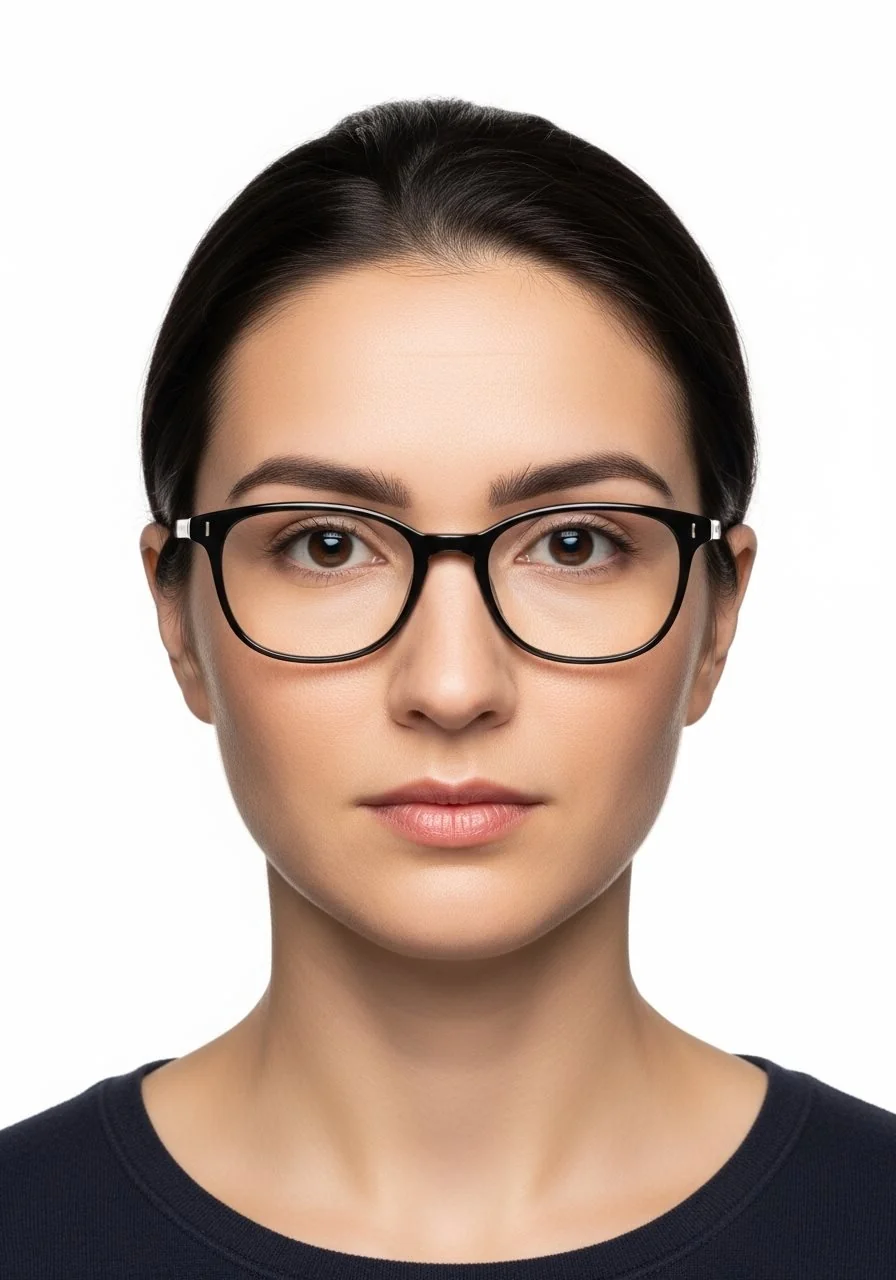
Your Tanzania eVisa photograph must meet the following specific technical requirements:
These specifications are mandatory and strictly enforced by the Tanzania Immigration Services. Make sure your photo meets all these criteria before uploading it to your online application.
The background of your Tanzania eVisa photo is a critical element that must meet specific standards:
Proper positioning of your face and head is essential:

Important digital file requirements for your eVisa photo
Maximum dimensions of 45mm x 35mm. Standard passport photo size is acceptable.
Maximum file size of 500 KB. Compress if necessary while maintaining quality.
Only JPG or JPEG format accepted. PNG and other formats will be rejected.
Color photograph required. Black and white photos are not accepted.
Understanding and avoiding these common mistakes will help ensure your Tanzania eVisa application is not delayed or rejected:
For more information on avoiding application errors, visit our guide on common mistakes to avoid on Tanzania eVisa application.


Your clothing and accessories in the photo should follow these guidelines:
The most reliable way to ensure your photo meets all requirements is to visit a professional photographer or photo service that specializes in passport and visa photos. They are familiar with international standards and can ensure your photo complies with Tanzania eVisa specifications.
If you prefer to take your own photo, follow these steps:
Several online tools and mobile applications can help you create compliant visa photos from a regular photo. These tools typically offer features like background removal, automatic cropping, and resizing to meet specific requirements.
Verify your photo meets all requirements before uploading
| Requirement | Specification | ✓ Check |
|---|---|---|
| File Format | JPG or JPEG only | ☐ |
| File Size | Maximum 500 KB | ☐ |
| Dimensions | Maximum 45mm x 35mm | ☐ |
| Photo Color | Color photograph (not black and white) | ☐ |
| Background | Plain, uniform color (white or light preferred) | ☐ |
| Face Position | Full face visible, looking directly at camera | ☐ |
| Expression | Neutral expression, mouth closed | ☐ |
| Eyes | Both eyes open and clearly visible | ☐ |
| Photo Age | Taken within the last 6 months | ☐ |
| Quality | Sharp focus, clear image, no blurriness | ☐ |
| Lighting | Even lighting, no shadows on face | ☐ |
| Obstructions | No hair, glasses glare, or objects covering face | ☐ |
While a compliant photograph is essential, it's just one of several documents required for your Tanzania eVisa application. You will also need:
For a complete list of all required documents, visit our comprehensive guide on Tanzania eVisa requirements.
When you're ready to apply for your Tanzania eVisa, you'll need to upload your photo as part of the online application process:
The standard processing time for Tanzania eVisa is typically 3-5 business days, though it's recommended to apply at least 7-10 days before your travel date.

While you can use the same photo that's in your passport, it must meet all the specified requirements for the eVisa application. The photo must be recent (taken within the last 6 months), in the correct digital format (JPG/JPEG), and meet all the size and quality specifications. If your passport photo is older than 6 months or doesn't meet the technical requirements, you should take a new photo.
If your photo file exceeds 500 KB, you'll need to compress it. You can use free online image compression tools or photo editing software to reduce the file size. When compressing, ensure you maintain good image quality so your face remains clear and recognizable. Most photo editing tools allow you to save images at different quality levels to achieve the desired file size.
Prescription glasses are generally acceptable in your eVisa photo, but they must not create glare or reflections that obscure your eyes. Your eyes must be clearly visible in the photo. If your glasses create significant glare or reflections, it's better to remove them for the photo. Sunglasses and tinted glasses are not permitted.
A white or light-colored uniform background is recommended for Tanzania eVisa photos. The most important aspect is that the background should be plain, with no patterns, textures, or objects visible. Light gray or off-white backgrounds are also acceptable, as long as they provide good contrast with your face and hair.
Yes, submitting a photo that doesn't meet the specified requirements is one of the most common reasons for eVisa application rejection. If your photo is deemed non-compliant, your application may be delayed while you're asked to submit a new photo, or it may be rejected entirely. To avoid delays and ensure approval, carefully check that your photo meets all requirements before submission. Visit our guide on Tanzania eVisa rejection reasons for more information.
Yes, you can take your own photo with a smartphone as long as it meets all the requirements. Modern smartphones have high-quality cameras capable of producing compliant photos. Use good lighting, position yourself against a plain background, and ensure the camera is at eye level. Many smartphone apps are available specifically for creating passport-style photos that meet international standards.
Now that you understand the photo requirements, start your Tanzania eVisa application
Apply Now for Tanzania eVisaSecure application • Fast processing • Expert support